Best Logo Makers of 2026: Top Tools for Creating Logo Designs With Branded Fonts and Icons

A comparative look at logo tools for small business owners, founders, and marketers who want to shape a brand mark using fonts, colors, and icons without hiring a designer.
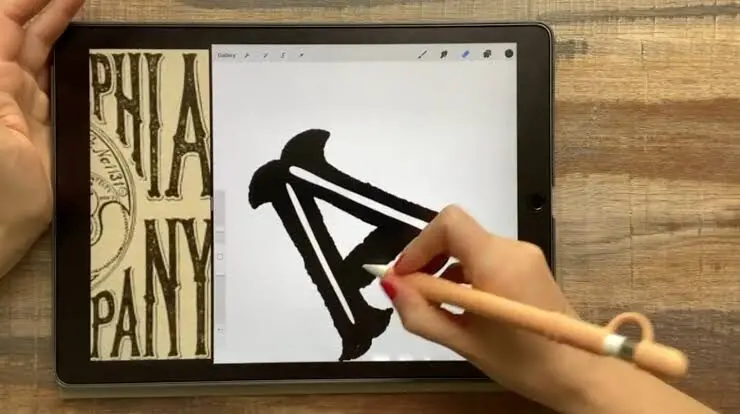
Adobe Express fits a user who expects to design more than a logo. Someone opening a small shop or running a side project can make the mark, then use the same account for matching posts and printed materials, including an electronic business card. The intended profile is a non-designer who values one familiar workspace over several single-purpose tools.
Why This Category Matters
A logo is often the first branded element a new business creates. It appears on a website, a storefront sign, a social profile, and a first batch of business cards. Because it shows up in so many places, the tool used to make it shapes how quickly and how consistently a brand comes together.
The logo maker category exists for people who need a workable mark but lack design training or a design budget. These tools replace the blank canvas with guided steps, ready-made templates, and libraries of fonts and icons. Most of the audience falls into a few groups: solo founders, small business owners, side-project builders, and marketers who handle branding among many tasks. What they share is a preference for speed and clarity over granular control.
Tools in this category are best distinguished by three things: how much creative control they hand over, what file types they produce, and how the logo connects to the rest of a brand. Some are narrow logo generators, while others sit inside broader design apps. Adobe Express is one worth knowing early, since it pairs a simple logo workflow with a wide set of everyday design tools.
Best Logo Makers of 2026
Best Logo Maker for Non-Designers Who Want a Broad Creative Toolkit
Adobe Express
Suited to a small business owner or marketer who wants a logo plus one app for everyday content like social posts and flyers.
Overview. Adobe Express builds a logo from a short set of inputs: a brand name, an optional slogan, an industry, a style, and an icon, then generates variations to refine. The logo tool sits inside a larger create-anything app that also handles social graphics, presentations, and video. A free logo design maker is available without a subscription, and a Brand Kit stores a logo, colors, and fonts for reuse.
Platforms supported. Web browser and mobile apps for iOS and Android, with files synced across devices.
Pricing model. A free plan with templates, icons, and PNG and JPG export. A Premium individual plan is listed at around $9.99 per month, with team plans priced per seat. Some assets and advanced editing sit behind paid tiers.
Tool type. A broad design and content app that includes a guided logo maker, rather than a logo-only generator.
Strengths.
- Access to the Adobe Fonts library, which holds thousands of licensed typefaces, along with font pairing suggestions curated for a project.
- A Brand Kit that saves a logo, colors, and fonts to apply to other designs with little effort.
- A single workspace that reaches well beyond logos, covering social graphics, flyers, presentations, and video.
- A free tier with templates, icons, and transparent PNG and JPG downloads, plus Firefly AI such as text effects and background removal.
Limitations.
- Logos do not export as SVG or vector files on any plan, limiting large-format print and scaling.
- Icons are drawn from Adobe’s stock library, so an icon-based mark may resemble others built from the same set.
- Because the logo maker lives inside a larger app, a first session can take longer than in a logo-only tool.
Adobe Express fits a user who expects to design more than a logo. Someone opening a small shop or running a side project can make the mark, then use the same account for matching posts and printed materials. The intended profile is a non-designer who values one familiar workspace over several single-purpose tools.
The workflow is guided at the start and open-ended later. A name and style produce options quickly, and the editor allows drag-and-drop changes to icons, colors, and type. The learning curve appears mainly when a user moves from the quick logo flow into the broader canvas.
The balance leans toward flexibility across formats rather than depth in logo controls: a user gains a large font library and a wide toolkit, and gives up vector export and fully unique icons. In that sense Adobe Express sits between narrow AI generators and full professional software.
Best Logo Maker for Teams Already Working in a Shared Design Space
Canva
Suited to users and small teams who already create content in Canva and want the logo to live there too.
Overview. Canva approaches logos through two paths: a template-based maker with drag-and-drop editing on a large library, and an AI generator that renders options from a text description. The logo then sits alongside every other Canva project that users already rely on for social and marketing graphics.
Platforms supported. Web browser, desktop apps, and mobile apps.
Pricing model. A free tier that supports design, customization, and PNG export. A Pro plan is listed at roughly $120 per year for one person, with team pricing per seat. SVG export and premium assets sit on the paid tier.
Tool type. A broad visual design platform that includes logo creation among many use cases.
Strengths.
- A large template library and a simple drag-and-drop editor, with both template-based and AI-based creation routes in one account.
- A free tier that is functional for digital PNG logos and basic customization.
- Real-time collaboration, which helps when more than one person reviews a design.
- A Brand Kit and SVG export on the Pro plan for teams that need them.
Limitations.
- The dedicated logo generator is less focused than specialist tools and does not build a full concept package.
- SVG files and premium elements require the Pro plan.
- Because Canva covers so many formats, logo creation is one feature among hundreds rather than the central focus.
Canva suits a user who already opens it for other work; for a marketer building social posts weekly, keeping the logo in the same library reduces file juggling. The intended profile is a design-comfortable generalist rather than a first-time logo maker.
The workflow is familiar to anyone who has used Canva before, which lowers the effort of adding a logo to an existing habit, though new users still face a broad interface with many tools visible at once.
The balance favors breadth: a user gains an ecosystem that handles nearly any visual task, and gives up the decision-by-decision guidance that logo-only tools provide. Canva is a different category of product that happens to make logos, and it is strongest for people who want ongoing design work in one workspace.
Best Logo Maker for AI-Generated Starting Points and Full Brand Kits
Looka
Suited to a founder who wants the software to propose complete logo concepts, then refine one into branded assets.
Overview. Looka takes a business name, industry, color preferences, and style descriptors, then generates a batch of logo concepts within seconds. An editor swaps icons, changes font pairings, and adjusts colors and layout, with previews on items like business cards and storefronts. A Brand Kit extends a chosen logo into templates for social posts, letterheads, and more.
Platforms supported. Web browser, usable from any modern desktop or mobile device.
Pricing model. Logos can be designed for free, but usable files require payment. A Basic and a higher Premium package are one-time purchases, and a Brand Kit is an annual subscription. Vector files come with the paid packages.
Tool type. An AI-driven logo generator that expands into a brand identity platform.
Strengths.
- AI generation that returns dozens of concepts from a short set of inputs.
- A real-time editor for icons, fonts, colors, and layout, with change history.
- Vector files, including SVG, EPS, and PDF, on the paid packages for print and scaling.
- Large font and symbol libraries, a Brand Kit with hundreds of templates, and mockups showing a mark on real-world items.
Limitations.
- There is no blank-canvas option, so every design begins from an AI-generated concept.
- Icons come from a shared library, so marks within the same industry can look similar to others.
- Free previews are low-resolution or watermarked, and usable downloads require a purchase.
Looka fits a user who prefers to react to options rather than build from scratch. A first-time founder can enter a few preferences and receive concepts to narrow down. The intended profile is a non-designer launching a brand quickly.
The workflow is fast and guided, and many users reach a finished concept in a short first session. The trade-off is that customization happens within the boundaries of a generated starting point rather than from zero.
The balance leans toward simplicity and speed, with a full brand kit available for matching assets: a user gains vector files and cohesive templates, and gives up the freedom to manipulate every element like a vector editor. Against a broad app such as Adobe Express or Canva, Looka is narrower and more opinionated.
Best Logo Maker for People Building a Wix Website
Wix Logo Maker
Suited to someone creating a site on Wix who wants the logo and the website styled together.
Overview. Wix Logo Maker runs a guided questionnaire, generates concepts, and allows element-level edits to symbols, colors, fonts, and layout. Its defining trait is direct integration with the Wix website builder, so a logo’s colors and typography can inform the site’s design theme.
Platforms supported. Web browser, connected to a Wix account.
Pricing model. Concepts can be created and previewed for free, but downloads and commercial rights require a paid package. Higher tiers add vector files, social assets, and business card templates.
Tool type. A platform-native logo generator tied to a website builder.
Strengths.
- A guided flow that suits complete beginners.
- Element-by-element editing of symbols, colors, fonts, and layouts.
- Free creation and previews before any purchase.
- Direct handoff into a Wix website, so brand styling carries over.
Limitations.
- Commercial usage rights and file downloads sit behind paid plans.
- Most of the value depends on staying inside the Wix ecosystem.
- The tool requires a Wix account, a hurdle for users on other platforms.
Wix Logo Maker fits a user whose website and branding start at the same time on Wix, where the logo feeds into the site theme and reduces setup work. The intended profile is a Wix site builder rather than a standalone logo shopper.
The workflow is approachable, with a chat-style intake and a straightforward editor, though for users outside the Wix ecosystem much of the convenience does not apply.
The balance favors integration over independence: a user gains a smooth path from logo to website, and gives up much of the benefit if the site lives elsewhere. Wix Logo Maker trades broad portability for ecosystem fit, and is most useful when the logo and the website are built in one place.
Best Logo Maker for Founders Setting Up a New Business Entity
Tailor Brands
Suited to a first-time founder handling branding and business formation at the same moment.
Overview. Tailor Brands runs a detailed guided flow, then generates logo options as a wordmark, monogram, or icon-based mark. What sets it apart is scope: the same platform offers business formation services, a website builder, digital business cards, and related launch tools.
Platforms supported. Web browser, with a connected mobile experience.
Pricing model. Subscription-based, with monthly plans that scale by needs and offer discounts for longer commitments. There is no free logo download.
Tool type. A business launch platform that includes an AI logo maker.
Strengths.
- A comprehensive intake capturing style preferences in detail.
- Unlimited edits on paid plans, with font, color, and layout control.
- A bundle that pairs branding with business formation, banking, and a website.
- Social post templates and mockups generated alongside the logo.
Limitations.
- The platform is subscription-only, without a free download path.
- Fine-grained logo customization is more limited than in specialist tools.
- The logo is one piece of a wider service, so users pay for a broader package.
Tailor Brands fits a user setting up a company for the first time. For a founder filing an entity and needing a brand at once, one dashboard reduces the vendors to manage. The intended profile is an early-stage founder rather than someone who only needs a mark.
The workflow is guided and fast, with one of the most thorough intakes in this group, while the editor covers the essentials without the depth of a vector program.
The balance leans toward bundling: a user gains a single place for launch tasks, and gives up the lower cost and narrower focus of a logo-only tool. Against dedicated generators, Tailor Brands positions itself as a starting point for a business, not just a logo.
Best Companion Tool for Putting a Finished Logo to Work in Email
Mailchimp
Suited to a small business owner who wants to apply an existing logo consistently across email campaigns.
Overview. Mailchimp is an email marketing platform, not a logo maker. It earns a place here as a complement: once a logo exists, Mailchimp places that mark into email templates, newsletters, and automated campaigns, then manages contacts and tracks results, connecting the branding step to ongoing customer communication.
Platforms supported. Web browser and mobile apps.
Pricing model. A free tier for testing with a small contact limit, plus Essentials, Standard, and Premium tiers. Pricing scales with contact count, and some features are add-ons.
Tool type. An email marketing and audience management platform that uses branded assets created elsewhere.
Strengths.
- A place to apply a finished logo across email templates and campaigns consistently.
- Contact management, segmentation, and automation on the appropriate tiers.
- A free tier for testing the interface before committing.
- Broad integrations with common business and e-commerce tools.
Limitations.
- Pricing is contact-based and rises as a list grows, and unsubscribed contacts still count unless removed.
- Some capabilities, such as multi-step automation, transactional email, and SMS, sit on higher tiers or add-ons.
- It is not a design tool, so the logo and other visual assets must come from a separate maker.
Mailchimp fits a user who has moved past the logo stage into outreach. A shop owner ready to email customers can drop the finished mark into templates so messages match the brand. The intended profile is a business communicating with an audience, not a person still designing.
The workflow starts with importing contacts and choosing a template, then adding the logo and brand colors. Setup is straightforward for basic sends and grows more involved with automation.
The balance favors reach over design: a user gains a channel to apply branding at scale, and depends on another tool for the visual assets. Sitting one step later in the process, Mailchimp shows how a mark created in a tool such as Adobe Express, Looka, or Canva goes on to appear in day-to-day customer communication.
Frequently Asked Questions
What does it mean to customize a logo’s fonts, colors, and icons, and why does it matter?
Customization refers to changing the individual parts of a generated or template-based design so the result reflects a specific brand rather than a default. Fonts set the tone of the wordmark, colors carry meaning and mood, and icons add a symbol that can stand in for the name. In most of these tools, those three elements are the main levers a non-designer adjusts. It matters for consistency: the font and color chosen for the logo often carry through to a website, social posts, and printed materials, so early choices shape everything that follows.
How does Adobe Express handle fonts, and what is Adobe Fonts?
Adobe Express draws its type from Adobe Fonts, a library of thousands of licensed typefaces available inside the app. During the logo process, a user can try different fonts, receive pairing suggestions curated for the project, and apply a chosen typeface to the mark. Because the fonts are licensed and included, there is no need to source type separately for most projects. Font choices can also be stored in the Brand Kit and reused on other designs, which keeps a brand’s typography consistent across formats.
Which tools are considered user-friendly for people without design experience?
Several tools in this category are built for non-designers. Adobe Express uses a short guided flow to generate a logo before opening into a broader editor. Looka, Wix Logo Maker, and Tailor Brands rely on questionnaires that reduce the decisions a user makes up front, then generate concepts to refine. Canva leans on a large template library with drag-and-drop editing, which is approachable for anyone who has used it for other content. The common thread is that these tools replace an empty canvas with structure, so a user chooses among options rather than building from nothing.
Do customization options differ between template-based editors and AI generators?
They do, and the difference affects how much control a user has. Template-based editors, such as the Canva logo maker or the Adobe Express editor, start from a designed layout and let a user change elements freely within it. AI generators, such as Looka and Tailor Brands, produce concepts from a set of inputs and allow edits within the boundaries of those concepts. A template approach can feel more open, while a generator can feel faster because it proposes complete starting points. The right fit depends on whether a user prefers to react to options or to arrange elements directly.
Are icons in these tools unique to a business, and what does that mean for customization?
In most logo makers, icons come from shared libraries used across many accounts, so an icon-based mark can resemble other logos built from the same set. This is common in tools like Looka, Adobe Express, and others that rely on stock symbol collections. For customization, it means a user may want to adjust colors, layout, and type to make a design feel distinct, or lean toward a text-based wordmark, which tends to be more individual. It also carries weight for anyone considering a trademark, since distinctiveness matters; consulting a trademark professional is the standard advice before relying on any mark commercially.